
NOTE: This page has been translated automatically from Russian to English. Original page.
Error V82.COMConnector server 64. Addressing
This article allows you to remove the problem. BUT - to reinstall the platform.
At the time, I faced with the problem of the creation of COM-connection on the server side. The problem is difficult to diagnose because code is perfectly working under the client refuses to work on a server, for example, if the code executes routine task.
The following proposed technique allows get rid of the problem. Unfortunately, after reinstalling the platform everything is back to normal and the procedure has to be repeated.
Related Links:
http://www.steeltrace.ru/details/articleid/22/%D1%80%D0%B5%D0%B3%D0%B8%D1%81%D1%82%D1%80%D0%B0%D1 % 86% D0% B8% D1% 8F-1% the D1% 81-com-% D0% BA% D0% BE% D0% BC% D0% BF% D0% BE% D0% BD% D0% B5% D0% BD% D1% 82% D0% B0-% D0% B4% D0% BB% D1% 8F-% D1% 80% D0% b0% D0% B1% D0% BE% D1% 82% D1% 8B-% D1 % 81-64-% D0% B1% D0% B8% D1% 82% D0% BD% D1% 8B% D0% BC% D0% B8-% D0% BF% D1% 80% D0% B8% D0% BB % D0% BE% D0% B6% D0% B5% D0% BD% D0% B8% D1% 8F% D0% BC% D0% B8.aspx
Upd. Supplement: If on Windows-based server is 64-bit server 64-bit 1C Company (in the distribution windows64.rar),
such a problem will not happen. It allows you to put preachers COM-connector without installation of the north. This is useful when an application is implemented on the platform 8.3 and COM-connection is necessary to databases 8.2.

For addition thanks brix8x.
The algorithm of the system setup, with the screen to each action.
Plan:
1. Stop the server 1C (recommended but not required)
2. Register the components comcntr.dll
3. Create a wrapper COM +, which allows 64-bit applications to communicate with 32-bit.
4. Reboot the server (physical). Not necessarily, but it is recommended
5. Start the server 1C. (Required :)
call the console

Register the component. The component is missing if there is only a server 1C. Somehow 1C publishes its only customer composition.

Start the service components. It describes the Windows Server 2008 R2 Standart.


The branch Components add a new component comcntr.dll


IMPORTANT!!! After installation, you need to slightly modify the properties. This subtlety is not described anywhere, without her I did not work!

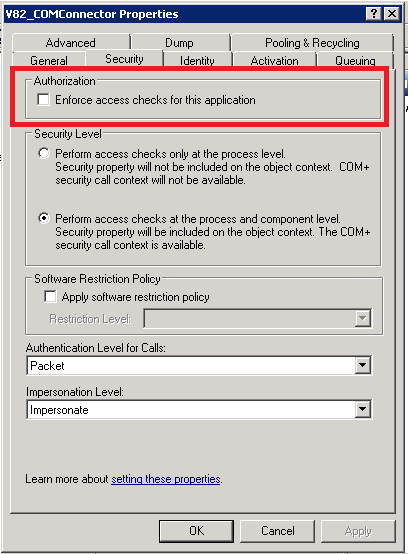


Restarting the physical server
Start 1C server.