
NOTE: This page has been translated automatically from Russian to English. Original page.
v82Server.dll - technology Microsoft COM + to access 1C82
Marvel not. Just connect you organize in advance.
I am not the author of the idea and bring a link to the original source . My modest contribution is to recompile the library, originally intended for the 1S77 1S81 for use with, and 1S82. For those who are too lazy to read 6 pages of discussion of the topic at the above forum, I will try to give here distillation of all these discussions.
1. What is it and why is it necessary?
When we connect to the database on the OLE 1S77 (with base 1S8h through COMConnector) on the database connection takes a few seconds, which limits the scope of application of this technology. In discussions I flashed the idea that it would be great to have an already running instance of 1C and with the help of some external components connected to it, and then disconnect. Since 1C is already running, the connection should take place much faster.
Actually, v82Server.dll (as v7Server.dll and v8Server.dll) does exactly this with the built-in Windows technologies COM +. Moreover, COM + provides us with additional bonuses:
1. We have the ability to customize the pool of running instances, that is, to specify their minimum and maximum number and the timeout after which the unused instances will be shut down. And watch out for all to herself subsystem COM +.
2. It is possible to remote execution procedures, ie v82Server.dll itself can be located on the server and on the client computer will install COM + subsystem formed stub (stub), forwards the call to the server.
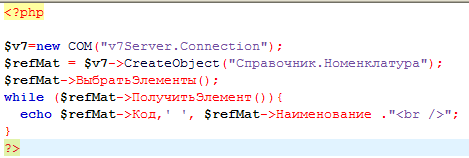
How to apply it? Well, for example, if you already have a website in PHP, then the organization of interaction with 1C you can write:
2. How do I configure this to work?
- Create a COM + application:
- Control Panel -> Administrative Tools -> Component Services;
- Find the "My Computer" node in the console tree. Open the properties and check on the "Default Properties" that allowed the computer performance of DCOM applications. If the tick is not necessary to include.
- In the console tree to find the node "My Computer -> Applications Com +" and the node context menu, select New -> Application;
- In the setup wizard, click the "create a new application" and enter the name of the application (eg "v82Server")
Activation method choose "server application" and proklatsat "Next" to complete the wizard.
- Create a component in the application
- In the newly created application to find a group of "Components" and select the context menu "New -> Component"
- Components in the setup wizard click "Install new component", specify the path to v82Server.dll file and click "Finish"
- In the properties of the component, on the tab "Activation" to enable the grouping of objects in the pool and specify the minimum and maximum pool size (eg 1 and 3);
- Enable the check box "Enable creation of objects" and in the "Design line" write the parameters of the connection string for V82.ComConnector (eg: Srvr = "mysrvr"; Ref = "UPP"; Usr = remote; Pwd = 123) (once I note that a remote user should be based on the external connection right);
- Launch an application (v82Server through the context menu).
Thereafter, in the process list should appear n 1cv8.exe processes, where n-minimum pool size of objects, and if you go into the database 1C and see a list of active users, we see n remote users.
Every customer who is trying to create v82Server.Connection object will receive it from the pool of objects (if any available objects in the pool), and after working with it will return an object to the pool.
Check that this thing works, it is possible with the help of the script:
set v82 = CreateObject ( "v82Server.Connection" )
MsgBox v82. UserName ()
3. How do I make it to the database connection and the Accounting and Commerce database?
2 Create the COM + application with different names, such as v8BUH and v8Trade. When you create the components indicate the proper connection string. When you programmatically create objects indicate the names "v8BUH.Connection" and "v8Trade.Connection"
4. How do I prevent my calling object on the local computer, and the code is executed on the remote?
- View in the Component Services console (Control Panel -> Administrative Tools -> Component Services) on the server - a computer that already has our COM + application, locate it in the tree and clicking the right mouse button to select "Export" from the context menu.
- In the wizard, select "Proxy setting application access from other computers to this" and assign the name of the MSI file that the wizard will generate for you.
- To transfer the generated wizard installation package to the client computer and install it.
- Installation requires administrator rights, so I did this:
- Start the Component Services console as administrator.
- In the console tree, find the node "My Computer -> Applications Com +" and the node context menu, select New -> Application;
- Setup Wizard click "Select an application ready" and choose our installation package.
- In the Services console client computer components should see the COM + application with the same name as the server, but its properties can not be modified, except for the parameter "Name of the remote server."
- Restart the COM + application on the server console.
Check the operation of the client can also use the above script. 1S82 code should be executed in the event that eight does not installed on the client computer.
PS. I checked the work of the component on MS Windows 2003 and XP. It is possible that something may not work. It depends on the security settings in your domain.
If there is no domain, then distant work with COM + application is possible if there is a user on the server under which you are working on your computer, it is the same with your password, you have rights to DCOM and use of this application. In general, read the FAQ in the console "Component Services". Everything is described in sufficient detail. In addition, I advise everyone to read and discuss the same as specified in the beginning of this article. In this branch can be found as components for access to the 1S77 and 1S81 with source code.
Good luck in your experiments!