
NOTE: This page has been translated automatically from Russian to English. Original page.
Restoring a file database performance. 0. Introduction
Stage 0. Introduction to the problems.
With stubborn intervals on the forums appear on 1C soul screams "Help! Fell file database, no backups, what to do?". Personally, I'm always at the same time remember the famous joke "Admins are divided into two types - those who do backups, and of those who will do them." But, throwing jokes aside, we try to seriously address this issue, because the situations are different. For example, backups made to disk, which is out of space or backups made through the discharge, and all such unloading recently proved inefficient. By the way, even administrators who consider themselves "experienced", pierced on such trifles.
As a warm-up, let me outline a few tips for the proper organization of backups, file database, failure of which may play a cruel joke:
- In addition to customized automatic daily backups, be sure to take an extra backup before critical operations such as updating configuration, TII, check database using chdbfl.exe etc.
- Make a backup archiving (copying) 1Cv8.1CD file or combine up to unloading in .dt. In no case do not limit the backup to only discharge .dt, because there were some errors in 1Cv8.1CD file may lead to the fact that the discharge will not have the information, or unloading in general can not be loaded. And if you can 1Cv8.1CD "pokoldovat" and try to extract the desired data in the case of completely missing data did not do anything.
- The procedure of creating a backup perform in a period when a database is not working users.
- Periodically check the free space on the device, which set up the automatic creation of backups.
- Try not to place backups on the same computer where the database itself and on other computers / storage in the network (for example, if the computer spoil your hard drive, or penetrate virus cipher, get torn down and the base, and backups). Try to place the backups periodically on additional (alternative) sources, such as cloud storage (dropbox, yandex disk, etc.), or on the flash drive.
But what to do if the worst has already happened, and destroyed the base, and the workers do not have backups, or are they very old?
Immediately say, that is not very complex cases (such as when on-base Companies operating normally, and it is impossible to enter only in the Configurator, or vice versa, or the problem occurs only under certain users) will not be considered as on the Internet there are lots of tips for solving these problems - by clearing the cache and "perezalivke" configuration before the upgrade version of the platform and unload all the data into a clean database. I would consider the most complicated cases, when the database is not possible to enter any mode of Enterprises or in the Designer mode under any one of the users. Symptoms of this may be different: 1C "hangs" when trying to log into the database, or gives messages like "Error stream format", "The database is completely destroyed," "database file is corrupt," "When you update the data after the last restructuring, a critical error has occurred, "" was detected partway save the configuration "or" drops "with the error message from the application of the operating system.
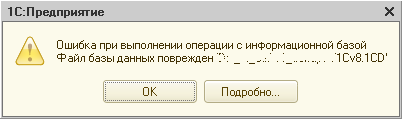
Initial steps for diagnosing such cases should be:
- We are sure to make the most of our initial backup database problem (prior to any manipulation with it) copying / archiving 1Cv8.1CD file and remove it in a safe place so that you do not accidentally damage.
- We try to enter into the database by other users.
- Completely clear the cache 1C (this can be done, for example, by simply removing the base from the list and adding it to the list again, or you can use tools like http://infostart.ru/public/90572/ or manually delete http: // help1c. com / faq / the view / 1267.html ).
- Try to move database file to another computer, and enter into the database there.
- Enlists the aid of the supplied utility chdbfl.exe 1C: Enterprise, installed daw "corrects the detected errors."
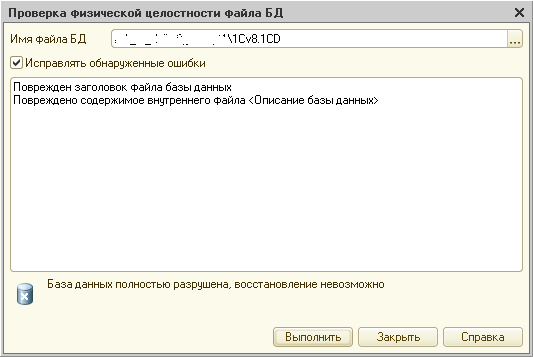
- You can still try to open a database on more recent releases 1C, for example, when working on 8.2.15, you can try to 8.2.17.
If all attempts have led to nothing, and we can state the fact that the "dead" base, it remains to choose the right option for further action. Option one, the banal - base pay for the repair specialist - will not consider here the problem of the technical plane leaves in the negotiation and financial. The second variant, tedious, lengthy and uncertain outcome - forward base in 1C, and wait for the result - also will not discuss, want to use it - please, but much to hope for a quick and positive decision, I would not. The third variant - to try to fix their own base - is precisely our theme.
So, you have decided to repair the database with their own hands, and plunge into the most mysterious jungle 1Cv8.1CD content file. What are the useful articles and tools we have at the present day?
- The first thing I advise you read the article http://infostart.ru/public/19734/ , containing a description .1CD file database format. It is highly recommend to read, comprehend, and put in the memory. Indeed, without a clear understanding of its base unit engaged in repairs very problematic.
- Still have official information about the purpose of some database tables from 1C: http://1c-dn.com/library/data_structure_in_1c_enterprise_8/?SECTION_CODE=data_structure_in_1c_enterprise_8&print=Y (unfortunately only angolyazychnaya).
- Unofficial information about tables and fields: http://main.1c-ei.ru/Home/help/objectdb/dbschema (Russian-speaking and more developed)
- Further, there is a great utility Tool_1CD http://infostart.ru/public/19633/ , allows you to visually browse and extract data from .1CD file in xml-files, and save the database configuration, the basic configuration and configuration provider. If the base of the collapsed only need to save the configuration - is the easiest and simplest option is exactly it. The downloaded in xml-files can load the data in part to another base by developing http://infostart.ru/public/143704/ , but is only supported by certain list of objects.
- Database recovery system 1C-base-Restoration 1C8: http://code.google.com/p/restoration-base-1c8/downloads/list . It is the configuration for 1C, which allows upload and edit manually the contents of the file base. Loading base is very long, it is necessary to have patience. He reads blocks, without relying on the data of the root object, so if you have a database with completely destroyed the root object, it can be very useful. Description of application Example: http://infostart.ru/public/158034/
- Component 1CDLib for direct read / write data from a database file .1CD http://infostart.ru/public/166557/ - only available for the current day tool to not only read data from the database file, and write (if not treated low-level access such as hex-editor, of course). This component allows you to use a file database, many available on the Internet tips client-server database repair (MS SQL, PostgreSQL, etc.), for example: http://www.gilev.ru/1c/81/restore/ , http://infostart.ru/public/116123/ . As is the external component for 1C, it allows 90% of the repair base by writing a certain code (script) in language 1C after the examination procedure, without resorting to the hex-editor.
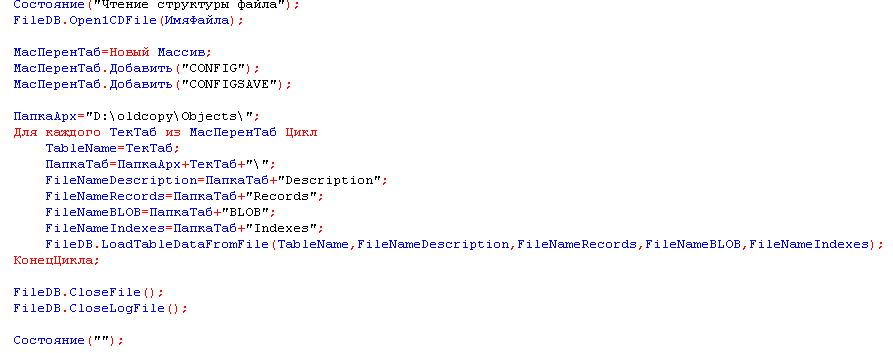
- The Hex-Editor HxD http://mh-nexus.de/en/hxd/ (in case you need something to see or touch up directly in manual mode). In principle, you can use either, but I liked this one.
I note that in the next series of articles will be assumed that the readers acquainted at least superficially with the listed items and utilities, and at this stage of the introduction offer is complete. Please express their views, comments and additions in the comments.
In the next article we consider in detail step of the failed inspection database and to identify problem areas.
The following steps: